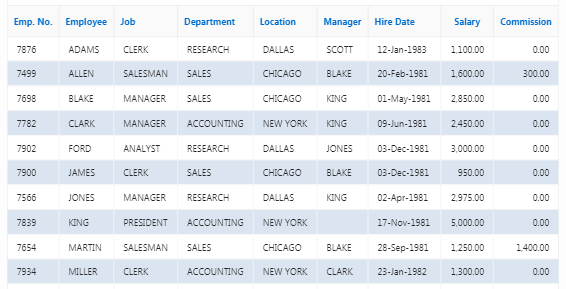
Change the color of the rows alternatively using a Simple CSS in Oracle APEX IR & IG Reports

Here I am giving an example to change the color of the rows alternatively using a simple CSS in Oracle APEX Interactive Report & Interactive Grid.

Step 1: Create a new blank page.

Step 2: Create a new Interactive Report or Interactive Grid region to the page. (Whichever you want)

Step 3: Set Static Id for each report regions (Interactive Report & Interactive Grid).
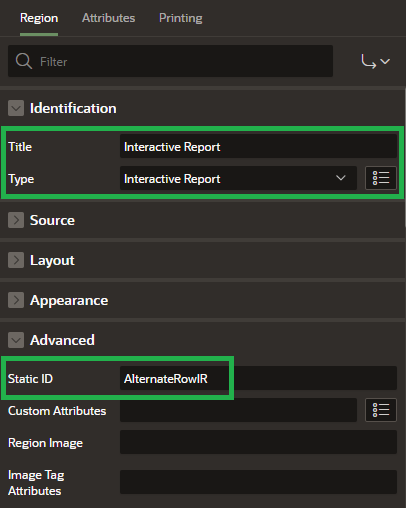
     
Step 4: Add CSS to the page in inline CSS section. It will change the color of the rows alternatively.

For Interactive Grid:

#AlternateRowIG .a-GV-table tr:nth-child(even)  .a-GV-cell {
    background-color: lightgreen;
}
#AlternateRowIG .a-GV-table tr:nth-child(odd)  .a-GV-cell {
    background-color: lightyellow;
}

For Interactive Report:

#AlternateRowIR .a-IRR-table tr:nth-child(odd) td {
     background-color: #DBE5F1;
}

#AlternateRowIR .a-IRR-table tr:nth-child(even) td {
     background-color: white;
}

The demo is here.

That's it.

Happy APEXing!!!...

Comments

Post a Comment

Popular posts from this blog

Friendly URL: Redirect to Different Page after Login in Oracle APEX 20.1

Oracle has updated apex.oracle.com to APEX 20.1 which includes among other features the new Friendly URL option. Here i am giving an example to redirect to different page after login in Oracle APEX 20.1 [Friendly URL Enabled] Step 1: Define home page for each user in emp master table as below Step 2: To enable Friendly URL Syntax, follow below steps, 1) On the Workspace home page, click the App Builder icon. 2) Select an application (The Application home page appears). 3) From Application home page, you can access the Definition page in TWO ways: Click the Edit Application Properties button. From Shared Components:              1) Click Shared Components .              2) Under Application Logic, click Application Definition Attributes . The Definition page appears. 4) Under Properties, configure the Friendly URL s attribute: Click Apply Changes to save your ch...

Printing Page Numbers in RTF Template [Oracle BI Publisher]

Here I am giving an example to print the page numbers dynamically in the RTF (Rich Text Format) template. Step 1:  Go to page footer and copy and paste the below script. Page |  <?fo:page-number?>  of  <?fo:page-number-citation:xdofo:lastpage-joinseq?> <fo:page-number> :   This is the object, which is used to represent the current page-number. <?fo:page-number-citation:xdofo:lastpage-joinseq?> :  This is the syntax, which is used to represent the total number of pages. Step 2:  Load the XML and preview the result. Output: That's it. References: fo:page-number Printing Page Number Code in Oracle XMLP RTF Template

Oracle Application Express Views (APEX)

Application Express Views Search SELECT * FROM apex_dictionary WHERE column_id = 0; View Comment Parent View APEX_APPLICATIONS Applications defined in the current workspace or database user. APEX_WORKSPACES APEX_APPLICATION_ALL_AUTH All authorization schemes for all components by Application APEX_APPLICATIONS ...